
Overview
This guide explains how to access your email account through Webmail without logging in to cPanel. Webmail allows you to send, receive, and manage your emails directly from your browser.
Steps
Step 1: Open the Webmail URL
Open your web browser and enter your Webmail address.
Example:
https://webmail.yourdomain.com
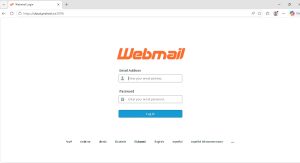
Step 2: Enter Your Login Details
Enter the following information:
Email Address
Password
Then click Log In.
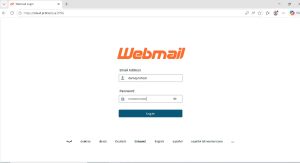
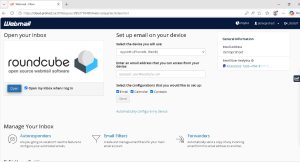
Step 3: Select a Webmail Application
After logging in, you may see a page displaying the available Webmail applications.
Select Roundcube.
To automatically open Roundcube in future logins, enable:
Open my inbox when I log in
Then click Open.
Step 4: Access Your Inbox
You will be redirected to the Roundcube interface where you can send, receive, and manage your emails.
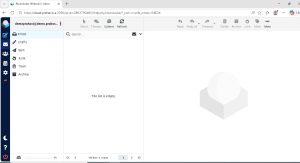
Result
You have successfully logged in to Webmail and can now manage your email messages through Roundcube.
How to Access Webmail ?
نظرة عامة
يوضح هذا الدليل كيفية الوصول إلى بريدك الإلكتروني من خلال Webmail دون الحاجة إلى تسجيل الدخول إلى cPanel. يتيح لك Webmail إرسال واستقبال وإدارة رسائل البريد الإلكتروني مباشرة من المتصفح.
الخطوات
الخطوة 1: فتح رابط Webmail
افتح المتصفح وانتقل إلى رابط Webmail الخاص بك.
مثال:
https://webmail.yourdomain.com
الخطوة 2: إدخال بيانات تسجيل الدخول
أدخل البيانات التالية:
عنوان البريد الإلكتروني
كلمة المرور
ثم اضغط على Log In.
الخطوة 3: اختيار تطبيق Webmail
بعد تسجيل الدخول قد تظهر لك صفحة تحتوي على تطبيقات Webmail المتاحة.
اختر Roundcube.
وإذا كنت ترغب في فتح Roundcube تلقائيًا عند تسجيل الدخول مستقبلًا، قم بتفعيل خيار:
Open my inbox when I log in
ثم اضغط على Open.
الخطوة 4: الوصول إلى صندوق البريد
سيتم فتح واجهة Roundcube ويمكنك من خلالها إرسال واستقبال وإدارة رسائل البريد الإلكتروني.
النتيجة
تم تسجيل الدخول إلى Webmail بنجاح ويمكنك الآن إدارة رسائل البريد الإلكتروني الخاصة بك من خلال Roundcube.